TON Storage: What is It, Challenges, and How to Use It

If you're building on TON or exploring Web3 tools, file storage is something you’ll need sooner or later. On this page, we explain what TON Storage is, how it works, and why it matters. You’ll find out how to store files through the TON network, what types of use cases it supports, and how it integrates with other parts of the TON ecosystem like smart contracts, NFTs, and decentralized apps.

TON Storage.

Whether you're a developer, a validator, or just testing the waters, this guide by TON Casinos will help you understand how TON handles decentralized file storage — and how you can start using it.

What is TON Storage?

TON Storage is a decentralized file storage layer built on top of The Open Network (TON) blockchain. It lets you store, download, and share files without relying on centralized storage services. Instead of putting files on one server or cloud provider, TON Storage distributes them across independent nodes around the world.

Representation of TON Storage as set of cells as data storage nodes.

The system is part of the larger TON ecosystem. TON was originally designed by the Telegram team and later handed over to the community. Now it powers tools like TON DNS, TON Sites, TON Proxy, and TON Payments — with TON Storage as the storage layer behind all of them.

TON Storage is made for both individuals and businesses. You can use it to store documents, media files, smart contract data, and even full websites. It works with public files, which anyone can download, and encrypted private files, which only you or your users can access.

This kind of decentralized file system is especially useful in Web3. Most NFTs, for example, use images, music, or video — but storing all that directly on-chain is expensive. TON Storage gives you a way to link heavy data to smart contracts without bloating the blockchain.

You don't need Toncoin to start using it. You don’t need to run a validator. You don’t even need to understand the internals of the blockchain. But if you’re planning to build real apps on TON, using TON Storage is probably your best bet for handling files.

The Challenges of Traditional Storage

Most storage systems today depend on centralized infrastructure. Files are stored on physical drives in specific locations, and if something goes wrong — like hardware failure, power outages, or even a fire — data can be lost. That’s why important files are usually copied to multiple servers or data centers in different regions.

Big companies build replication systems and maintain global data centers to avoid data loss and slow delivery. But this comes with high costs and technical complexity. For smaller projects, this level of redundancy isn’t always possible.

Another issue is access speed. If you’re in Europe and your data is hosted in the US, you’ll likely get slower download speeds. To fix this, many services use CDNs (Content Delivery Networks). These networks keep cached copies of data in multiple locations to make access faster for users around the world. But CDNs are still centralized solutions controlled by large providers.

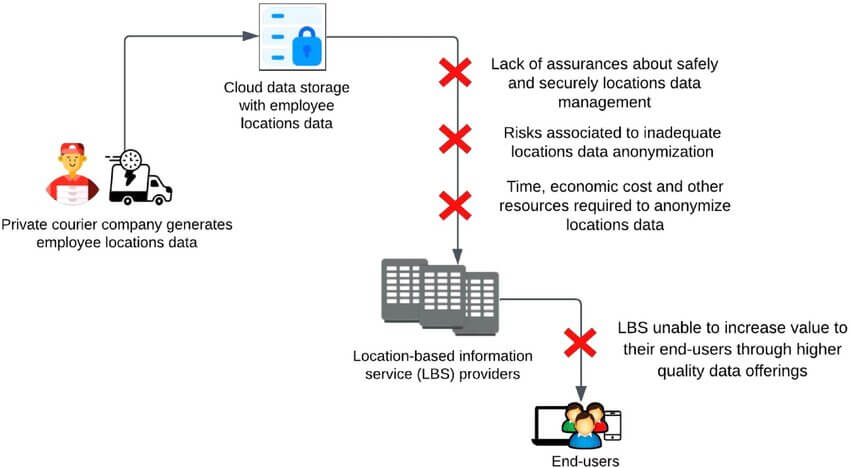
Traditional data storage system challenges.

The core problem here is that we’re using centralized tools to try to make storage feel decentralized. The more users and services rely on these setups, the more single points of failure we get — and that goes against the idea of Web3.

What Problems TON Storage Solves

TON Storage removes the need for centralized servers or cloud providers. Instead, it distributes files across a network of independent nodes. Anyone with enough resources can run a storage node and start contributing to the system.

There’s no need for physical replication across corporate-owned data centers. The TON network handles redundancy by design. Files are shared across multiple storage nodes, so if one node goes offline, others still hold the data.

TON Storage also avoids the need for costly on-chain file storage. Storing files directly in smart contracts or blocks is expensive. With TON Storage, you store files off-chain but connect them securely to the blockchain using a unique file identifier (BagID) and cryptographic proof.

What makes it different from torrents is that it includes blockchain-level storage commitments. When you want your data stored reliably, you can create a smart contract with a storage provider. The contract includes payment in Toncoin and proof-of-storage rules. If the provider loses the file or fails to respond to a proof request, they lose the reward or even their deposit.

In short, TON Storage gives you a decentralized file network with real guarantees. No centralized control. No CDN dependencies. Just a smart way to store and serve files globally on Web3.

How TON Storage Works

TON Storage runs on top of The Open Network and uses decentralized protocols for storing, distributing, and verifying files. It’s similar to torrent-based file sharing but integrated with blockchain logic and cryptography. Let’s break down how it works from a technical and practical point of view.

Torrent-Based Architecture

TON Storage is often described as "Torrents 3.0." It uses similar peer-to-peer distribution logic — but replaces centralized trackers with a distributed hash table (DHT) and adds encryption, Bag IDs, and smart contract integration.

When you upload a file, it gets packed into a container called a Bag. This Bag is then broadcast to the network using the storage-daemon. You don’t need to pay fees, and the file remains on your local machine — but others can now access it globally. The Bag is referenced by a unique hash called BagID, which works as a file fingerprint and access key.

Files stored via TON Storage are immutable. If the content changes, a new BagID is generated.

The BagID System

BagID is a 64-character hexadecimal string (or base64 hash) generated from the contents and metadata of the file or folder. Anyone with the BagID can download the file. Once they do, they also begin to "seed" it, just like in torrent systems.

Files are distributed across the network automatically. The more people download the Bag, the more copies exist, increasing availability and redundancy.

Example download URL (for public bags):

                    http://storage.ton/gateway/<BagID>/filename.png
                

Storage-Daemon: Uploading Files

The TON Storage Daemon is the core utility that handles file uploads and sharing. As of late 2025, the node requirements have remained lightweight for basic storage, though full validation requires more power.

Minimum storage node requirements (2025-2026):

  • CPU: 2 cores @ 1GHz
  • RAM: 2GB (8GB+ recommended for high-load nodes)
  • Disk: 2GB SSD for system (plus storage space for files)
  • Network: 10Mbps+ with a static IP
  • OS: Linux (Ubuntu 22.04+ recommended), Windows, macOS
  • GitHub repo: https://github.com/ton-blockchain/storage-daemon

Basic upload command:

bash storage-daemon -v 3 -C global.config.json -I :3333 -p 5555 -D storage-db
                

This starts the daemon, sets the working directory ( storage-db), and opens the node to the network. All Bags and files are stored in structured folders under storage-db/torrent/torrent-files.

Using TON CLI to Control the Node

To manage the node, you use storage-daemon-cli with the generated client and server keys:

                    bash


CopyEdit
storage-daemon-cli -I 127.0.0.1:5555 \
-k storage-db/cli-keys/client \
-p storage-db/cli-keys/server.pub

Sample commands:

  • create <file> – Generate a BagID;
  • add-by-hash <BagID> – Download file by BagID;
  • get-peers <BagID> – List seeding peers;
  • upload-resume <BagID> – Restart upload;
  • download-resume <BagID> – Resume download;
  • remove <BagID> – Remove Bag and files;
  • priority-idx <BagID> <idx> <priority> – Set download priority per file;

For the full command list, see: https://github.com/ton-blockchain/storage-gateway?tab=readme-ov-file#download-storage-daemon-and-storage-daemon-cli

ADNL: The Underlying Data Transport

TON uses a custom protocol called ADNL (Abstract Datagram Network Layer) to send and receive data. It’s built over UDP but supports TCP as fallback. Each node has a unique ADNL address, which is a SHA256 hash of a serialized ECC public key.

ADNL ensures:

  • End-to-end encryption.
  • Sender signing.
  • Node discovery.
  • Stateless data transfer.

DHT: Finding Files in the Network

TON DHT is a distributed hash table based on Kademlia. It maps BagIDs to IP addresses and ports of nodes that are sharing the files.

When a user wants to download a Bag:

  1. They send a DHT request using the BagID.
  2. They receive a list of available nodes.
  3. They start downloading the file from multiple peers at once.

By default, nodes are not anonymous — each one is tied to an IP address.

Public Gateways

If you don’t want to run the daemon yourself, you can access public files via browser:

                                    text


CopyEdit
http://storage.ton/gateway/<BagID>/<filename>

This is useful for integrations with dApps, especially when you don’t want to install any local tools.

Using TON Storage on Raspberry Pi or VPS

You can run a TON Storage node on devices like Raspberry Pi or any basic VPS, as long as they meet the minimum specs. The only limitation is the need for a static IP, which home ISPs often don’t provide. VPS hosting solves this problem.

DevOps Testing with GitHub Actions

For developers building dApps or integrating storage in CI/CD, GitHub Actions can automate test deployments.

Basic .github/workflows/tests.yaml example:

                                            yaml


CopyEdit
name: TON Storage CI

on:
  push:
    branches: [ main ]
  pull_request:
    branches: [ "**" ]

jobs:
  test:
    runs-on: ubuntu-latest
    steps:
      - name: Checkout code
        uses: actions/checkout@v2

      - name: Set up QEMU
        uses: docker/setup-qemu-action@v1

      - name: Build Docker image
        uses: docker/build-push-action@v2
        with:
          context: .
          platforms: linux/arm64
          load: true
          tags: ton-storage:latest

      - name: Run Storage Daemon
        run: |
          ./app/ton/storage-daemon-linux-arm64 -v 5 \
            -C ./app/ton/global.config.json \
            -I localhost:3333 \
            -p 5555 \
            -D ./app/ton/storage-db > /dev/null 2>&1 &
          sleep 5 && npm run test

This is just a starting point, but it’s enough to test the full upload/download flow inside a CI pipeline.

File Verification and Redundancy

One of the core features of TON Storage is that it ensures file integrity using cryptographic verification. Every file that enters the network is hashed and signed. When other nodes download it, they check these signatures to confirm that the file is intact and untampered.

Files are immutable. If the content changes, the system will generate a completely new BagID. This prevents accidental overwrites and ensures long-term consistency for things like NFTs, dApps, or document hosting.

As more users download the same file, more nodes in the network start storing pieces of it. This improves reliability and speeds up distribution. You don’t need centralized infrastructure like a CDN — TON Storage turns every participant into a potential provider.

Earning with TON Storage: Becoming a Provider

If you're running a stable node with decent uptime, you can offer storage as a service. This works using smart contracts between you (the storage provider) and the file owner (the client). Here's how:

  1. The provider launches the daemon and deploys a smart contract on the TON blockchain.
  2. The client generates a Bag and sends a special internal message to the contract.
  3. The contract creates a storage commitment — a promise that the provider will store the Bag.
  4. The provider downloads the Bag and proves they have it using Merkle proofs.
  5. The client sends a payment in Toncoin through the contract.
  6. The provider continues showing proof of storage to keep receiving rewards.

If the file is lost or not verified, the contract is broken and the provider doesn’t get paid. This system encourages uptime and data integrity without requiring constant manual work.

Official smart contract repo: https://github.com/xssnick/tonutils-storage.

Note: There’s no large-scale storage marketplace on TON yet. You’ll need to find users manually or run your own use case. But the protocol and contracts are ready to use.

Integrations with the TON Ecosystem

TON Storage is not a standalone system. It integrates with other core components of The Open Network, making it useful for real-world applications like hosting websites, managing NFTs, and creating on-chain service agreements. Here's how TON Storage connects with the rest of the TON stack.

TON DNS

By default, every file in TON Storage is identified by a BagID — a long hexadecimal string. While functional, it's not very user-friendly.

With TON DNS , you can assign a readable domain name to any BagID. This makes it easier to share files or host content with recognizable links.

For example, instead of: http://storage.ton/gateway/7FEA7AF2325F0A5B6908939C9D72F92DB4C0CA52CCA8CE2C48BB2708BF188541/index.html

You can use: http://example.ton/index.html.

To do so, you just enter the BagID into the "Storage" field of your TON DNS domain. Here’s the guide on how to assign TON domain to BagID.

TON Blockchain

One key limitation of traditional peer-to-peer file systems is the lack of guarantees. Files may disappear if no one seeds them, and there’s no way to enforce availability.

TON fixes that with smart contracts.

A user and a storage node can deploy a contract on the TON blockchain that defines how long the node must store a file and how much Toncoin will be paid for it.

The contract:

  • Periodically requests a random part of the file
  • Verifies it using Merkle-proof cryptography
  • Pays the provider if the proof is valid
  • Terminates the agreement if the file is missing

This is automated and trustless — no one needs to interact manually. There’s also an option to require a deposit from the provider. If the file disappears, the deposit is transferred to the client.

If a user's balance runs out, the contract stops paying, and the provider can stop storing the file.Here’s the guide with contract templates: TON Storage Provider Setup.

TON Sites

TON Sites allow developers to host static websites directly on the TON network, with no server, no IP address, and no DNS registrar.

When used with TON Storage, the entire website — HTML, JS, CSS, media — is stored in a Bag and shared across the network. The site remains accessible via its BagID or DNS name.

This setup removes the need for centralized hosting or SSL certificates. Everything is encrypted and distributed.

Example: a fully decentralized site hosted at http://just-for-test.ton/index.html

Here’s the guide: How to host a static TON Site in TON Storage.

TON NFTs

NFTs on TON use smart contracts for ownership, but the actual content — images, videos, music — is stored off-chain. That’s where TON Storage comes in.

With native integration, TON Storage can hold the media files associated with NFTs. BagIDs are linked directly in the NFT smart contract metadata.

This approach keeps the blockchain lightweight while preserving content availability.

The standard TON NFT contract already includes support for this setup. Collection creators can migrate or mint NFTs with media stored on TON Storage.

Here’s the guide: Migrate TON NFT content to TON Storage.

Telegram Mini Apps

With the explosive growth of Telegram Mini Apps in 2025, TON Storage has become a critical backend layer. Developers use it to host static assets (like images, scripts, and game data) in a decentralized way that complies with Telegram's Web3 guidelines.

This integration allows Mini Apps to remain fully decentralized—users access the interface via Telegram, but the underlying data lives on the unstoppable TON Storage network.

Early 2026 Roadmap & Updates

In late 2025, TON Storage received significant infrastructure boosts as part of the broader "Accelerator" mainnet upgrade. This update optimized how data is synchronized across nodes, improving speed and reliability for decentralized file hosting.

Key developments in 2026 include:

  • Optimized Node Sync: The "Accelerator" update reduced latency for storage nodes, making file retrieval faster globally.
  • Mini App Integration: Developers can now link TON Storage directly to Telegram Mini Gambling Apps, allowing users to upload and retrieve decentralized content without leaving the messenger.
  • Enhanced DHT Protocol: Updates to the Distributed Hash Table (DHT) have made the network more resilient against censorship and connectivity issues.

Handling Private Data

When it comes to securing your private files on TON Storage, encryption is key. By encrypting your data before uploading it, you ensure that only those with the decryption key can access the content. This method keeps your files secure without the need for additional passwords, leveraging your TON wallet's security features.

TON Storage vs. Centralized Cloud Solutions

Think of TON Storage as a decentralized alternative to services like Amazon S3 or traditional Content Delivery Networks (CDNs). Unlike centralized providers, TON Storage welcomes both large-scale operators and individual node runners. There's no need for hefty marketing budgets or specialized hardware to join the network. Plus, setting up a TON Storage node doesn't require purchasing TON tokens upfront, making it accessible to a broader audience.

Use Cases and Developer Opportunities

TON Storage opens the door to a variety of applications:

  • File Sharing Portals: Create platforms where users can share files securely and efficiently.
  • Decentralized Dropbox-style Apps: Develop applications that allow users to store and sync files without relying on centralized servers.
  • Media Hosting: Host images, videos, and other media content in a decentralized manner.
  • NFT Storage: Securely store metadata and media files associated with Non-Fungible Tokens (NFTs), ensuring their longevity and accessibility.
  • Secure File Delivery for dApps: Enhance decentralized applications by integrating secure and reliable file storage solutions.

For developers, tools like GitHub Actions and QEMU workflows facilitate automated testing, streamlining the development process. Gateway services also enable dApps to utilize TON Storage without requiring users to set up local environments.

Market Potential and Monetization

Operating a storage node on TON Storage isn't just about contributing to the network; it's also a potential revenue stream. Storage providers can earn Toncoin through smart contracts, with payments triggered only after proof of storage is verified.

As of late 2025, while a unified "one-click" marketplace is still evolving, the foundational smart contracts are fully operational. Providers are actively earning by engaging in direct storage agreements with dApp developers and NFT projects looking for decentralized hosting solutions.

Next Steps and the Future of TON Storage

The horizon for TON Storage is filled with exciting possibilities:

  • Marketplace Development: Building a robust platform for storage node operators to offer their services.
  • Integration with TON Payments: Streamlining automatic rewards and transactions within the network.
  • Developer Engagement: Encouraging developers to build innovative solutions on top of TON Storage.
  • Community Tools: Projects like TON Torrent, built with Go, showcase the potential of community-driven tools, though broader adoption is needed.
  • Long-Term Storage Solutions: Positioning TON Storage as a reliable option for TON, Web3, and potentially Telegram-related use cases.

By embracing these developments, TON Storage is set to play a pivotal role in the decentralized web's future.